 Jamie Pine
8377152d86
Jamie Pine
8377152d86
New Spacedrive-inspired landing page with dark warm color system, glassmorphic navbar, feature cards with animated illustrations, and an interactive ControlUI mockup that cycles through voice generations with real audio playback via WaveSurfer.

The ControlUI demo script is fully data-driven - profiles, generation text, audio samples, and effects are all configurable from a single DEMO_SCRIPT array.

Includes 6 real voice samples (Jarvis, Morgan Freeman, Sam Altman, Samuel L. Jackson, Linus Tech Tips, Fireship) converted to webm opus.

Voicebox
The open-source voice synthesis studio.
Clone voices. Generate speech. Build voice-powered apps.
All running locally on your machine.


voicebox.sh • Download • Features • API • Roadmap
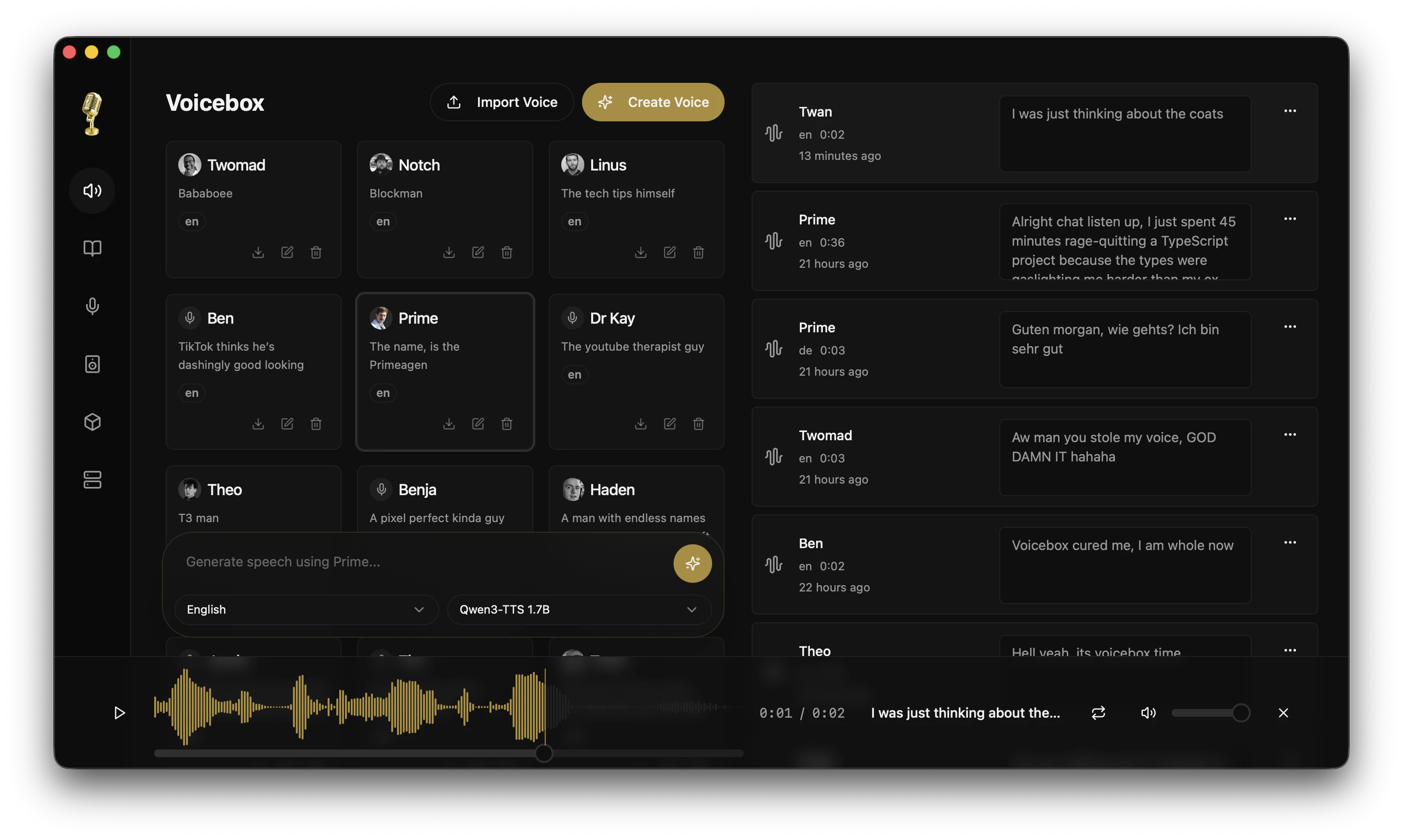
Click the image above to watch the demo video on voicebox.sh


What is Voicebox?
Voicebox is a local-first voice cloning studio with DAW-like features for professional voice synthesis. Think of it as a local, free and open-source alternative to ElevenLabs — download models, clone voices, and generate speech entirely on your machine.
Unlike cloud services that lock your voice data behind subscriptions, Voicebox gives you:
- Complete privacy — models and voice data stay on your machine
- Professional tools — multi-track timeline editor, audio trimming, conversation mixing
- Model flexibility — currently powered by Qwen3-TTS, with support for XTTS, Bark, and other models coming soon
- API-first — use the desktop app or integrate voice synthesis into your own projects
- Native performance — built with Tauri (Rust), not Electron
- Super fast on Mac — MLX backend with native Metal acceleration for 4-5x faster inference on Apple Silicon
Download a voice model, clone any voice from a few seconds of audio, and compose multi-voice projects with studio-grade editing tools. No Python install required, no cloud dependency, no limits.
Download
Voicebox is available now for macOS and Windows.
| Platform | Download |
|---|---|
| macOS (Apple Silicon) | Voicebox_aarch64.app.tar.gz |
| macOS (Intel) | Voicebox_x64.app.tar.gz |
| Windows (MSI) | Latest Windows MSI |
| Windows (Setup) | Latest Windows Setup |
Linux — Pre-built binaries are not yet available. Linux users can compile from source, see Development below.
Features
Voice Cloning with Qwen3-TTS
Powered by Alibaba's Qwen3-TTS — a breakthrough model that achieves near-perfect voice cloning from just a few seconds of audio.
- Instant cloning — Upload a sample, get a voice profile
- High fidelity — Natural prosody, emotion, and cadence
- Multi-language — English, Chinese, and more coming
- Lightning fast on Mac — MLX backend leverages Apple Silicon's Neural Engine for super-fast generation
Voice Profile Management
- Create profiles from audio files or record directly in-app
- Import/Export profiles to share or back up
- Multi-sample support — combine multiple samples for higher quality cloning
- Organize with descriptions and language tags
Speech Generation
- Text-to-speech with any cloned voice
- Batch generation for long-form content
- Smart caching — regenerate instantly with voice prompt caching
Stories Editor
Create multi-voice narratives, podcasts, and conversations with a timeline-based editor.
- Multi-track composition — arrange multiple voice tracks in a single project
- Inline audio editing — trim and split clips directly in the timeline
- Auto-playback — preview stories with synchronized playhead
- Voice mixing — build conversations with multiple participants
Recording & Transcription
- In-app recording with waveform visualization
- System audio capture — record desktop audio on macOS and Windows
- Automatic transcription powered by Whisper
- Export recordings in multiple formats
Generation History
- Full history of all generated audio
- Search & filter by voice, text, or date
- Re-generate any past generation with one click
Flexible Deployment
- Local mode — Everything runs on your machine
- Remote mode — Connect to a GPU server on your network
- One-click server — Turn any machine into a Voicebox server
API
Voicebox exposes a full REST API, so you can integrate voice synthesis into your own apps.
For the current local app and development workflow, the backend is typically available at http://localhost:17493.
If you launch the backend manually with a different host or port, use that address instead.
# Generate speech
curl -X POST http://localhost:17493/generate \
  -H "Content-Type: application/json" \
  -d '{"text": "Hello world", "profile_id": "abc123", "language": "en"}'

# List voice profiles
curl http://localhost:17493/profiles

# Create a profile
curl -X POST http://localhost:17493/profiles \
  -H "Content-Type: application/json" \
  -d '{"name": "My Voice", "language": "en"}'
Use cases:
- Game dialogue systems
- Podcast/video production pipelines
- Accessibility tools
- Voice assistants
- Content creation automation
Full API documentation is available at http://localhost:17493/docs in the default local workflow, or at /docs on whatever server address you configured.
Tech Stack
| Layer | Technology |
|---|---|
| Desktop App | Tauri (Rust) |
| Frontend | React, TypeScript, Tailwind CSS |
| State | Zustand, React Query |
| Backend | FastAPI (Python) |
| Voice Model | Qwen3-TTS (PyTorch or MLX) |
| Transcription | Whisper (PyTorch or MLX) |
| Inference Engine | MLX (Apple Silicon) / PyTorch (Windows/Linux/Intel) |
| Database | SQLite |
| Audio | WaveSurfer.js, librosa |
Why this stack?
- Tauri over Electron — 10x smaller bundle, native performance, lower memory
- FastAPI — Async Python with automatic OpenAPI schema generation
- Type-safe end-to-end — Generated TypeScript client from OpenAPI spec
Roadmap
Voicebox is the beginning of something bigger. Here's what's coming:
Coming Soon
| Feature | Description |
|---|---|
| Real-time Synthesis | Stream audio as it generates, word by word |
| Conversation Mode | Multi-speaker dialogues with automatic turn-taking |
| Voice Effects | Pitch shift, reverb, M3GAN-style effects |
| Timeline Editor | Audio studio with word-level precision editing |
| More Models | XTTS, Bark, and other open-source voice models |
Future Vision
- Voice Design — Create new voices from text descriptions
- Project System — Save and load complex multi-voice sessions
- Plugin Architecture — Extend with custom models and effects
- Mobile Companion — Control Voicebox from your phone
Voicebox aims to be the one-stop shop for everything voice — cloning, synthesis, editing, effects, and beyond.
Development
See CONTRIBUTING.md for detailed setup and contribution guidelines.
Quick Start
git clone https://github.com/jamiepine/voicebox.git
cd voicebox

just setup   # creates Python venv, installs all deps
just dev     # starts backend + desktop app
Install just: brew install just or cargo install just. Run just --list to see all commands.
Also available via Makefile: make setup && make dev (run make help for all commands).
Prerequisites: Bun, Rust, Python 3.11+, XCode on macOS, Tauri Prerequisites.
Performance:
- Apple Silicon (M1/M2/M3): Uses MLX backend with native Metal acceleration for 4-5x faster inference
- Windows/Linux/Intel Mac: Uses PyTorch backend (CUDA GPU recommended, CPU supported but slower)
Project Structure
voicebox/
├── app/              # Shared React frontend
├── tauri/            # Desktop app (Tauri + Rust)
├── web/              # Web deployment
├── backend/          # Python FastAPI server
├── landing/          # Marketing website
└── scripts/          # Build & release scripts
Contributing
Contributions welcome! See CONTRIBUTING.md for guidelines.
- Fork the repo
- Create a feature branch
- Make your changes
- Submit a PR
Security
Found a security vulnerability? Please report it responsibly. See SECURITY.md for details.
License
MIT License — see LICENSE for details.