 James PineandClaude Opus 4.7
6b75e097e1
James PineandClaude Opus 4.7
6b75e097e1
The pill window now surfaces for agent-initiated speech without main-window
involvement. Rust subscribes to /events/speak via a tokio task + reqwest
streaming body (speak_monitor.rs), shows the pill, and forwards events to
the dictate webview over Tauri's event bus. The pill plays audio via a
plain HTMLAudioElement and emits dictate:hide when playback ends. The
pill stays hidden through the ~1 s generation wait and only surfaces when
audio actually starts, with the counter armed at that moment.

Fixes a shared-dict mutation in mcp_server/events.publish() that caused
the second subscriber (Rust speak_monitor) to receive `event: message`
instead of named speak-start/speak-end frames. Also teaches the speak_monitor
parser to handle CRLF framing (sse-starlette default). Main-window
AudioPlayer now skips autoplay for source in {mcp, rest} to avoid
double-play when both windows are alive.

Co-Authored-By: Claude Opus 4.7 (1M context) <[email protected]>

Voicebox
The open-source AI voice studio.
Clone any voice. Generate speech. Dictate into any app. Talk to agents in voices you own.
The full voice I/O stack, running locally on your machine.


voicebox.sh • Docs • Download • Features • API • Troubleshooting
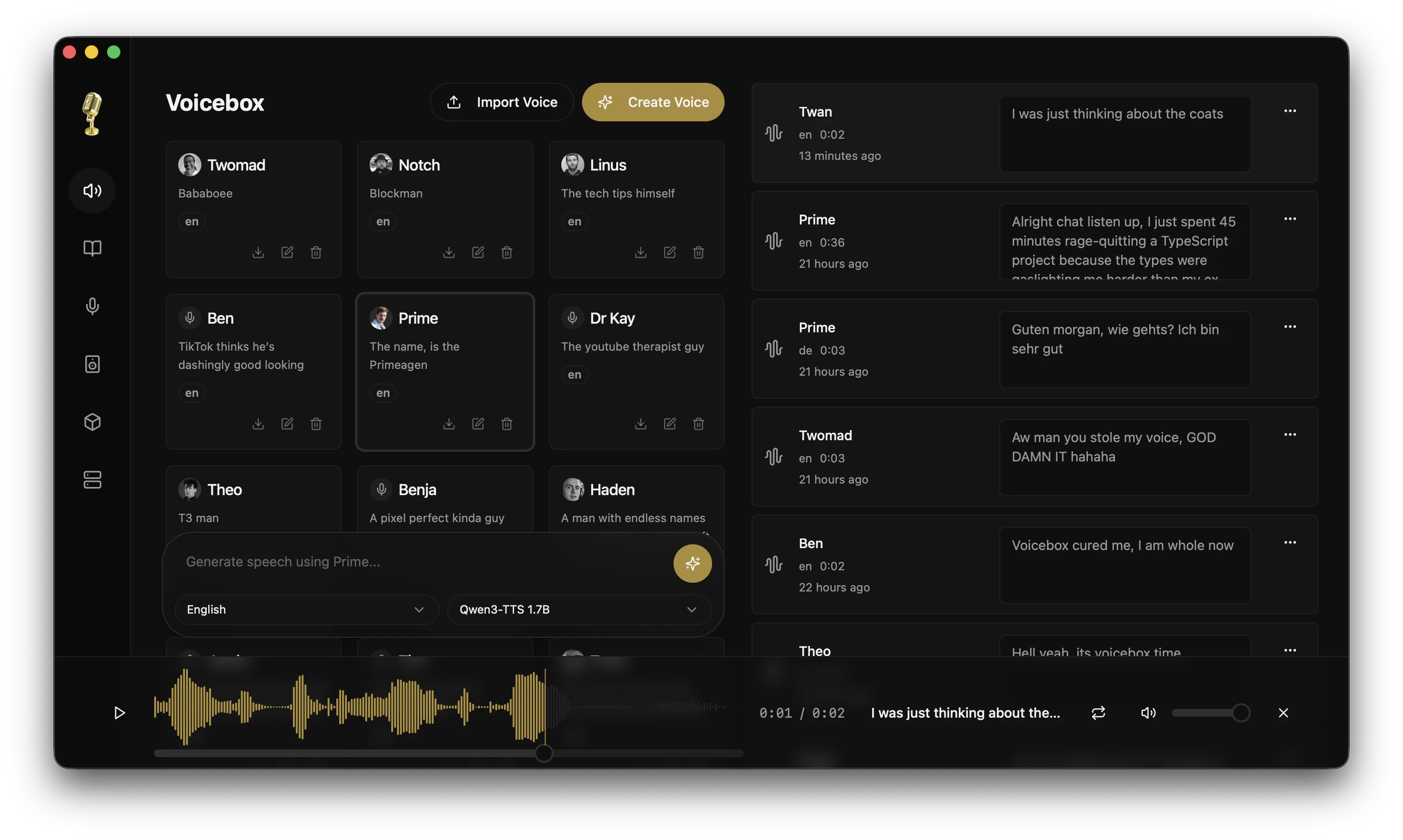
Click the image above to watch the demo video on voicebox.sh


What is Voicebox?
Voicebox is a local-first AI voice studio — a free and open-source alternative to ElevenLabs and WisprFlow in one app. Clone voices from a few seconds of audio, generate speech in 23 languages across 7 TTS engines, dictate into any text field with a global hotkey, and route captured speech through a local LLM into a cloned voice for end-to-end voice conversations with AI agents.
The two cloud incumbents sit on opposite halves of the voice I/O loop — ElevenLabs on output, WisprFlow on input. Voicebox does both, bridges them with a persona LLM, and runs the whole thing on your machine.
- Complete privacy — models, voice data, and captures never leave your machine
- 7 TTS engines — Qwen3-TTS, Qwen CustomVoice, LuxTTS, Chatterbox Multilingual, Chatterbox Turbo, HumeAI TADA, and Kokoro
- Voice cloning and preset voices — zero-shot cloning from a reference sample, or 50+ curated preset voices via Kokoro and Qwen CustomVoice
- 23 languages — from English to Arabic, Japanese, Hindi, Swahili, and more
- Post-processing effects — pitch shift, reverb, delay, chorus, compression, and filters
- Expressive speech — paralinguistic tags like
[laugh],[sigh],[gasp]via Chatterbox Turbo; natural-language delivery control via Qwen CustomVoice - Unlimited length — auto-chunking with crossfade for scripts, articles, and chapters
- Stories editor — multi-track timeline for conversations, podcasts, and narratives
- Voice input — global hotkey dictation, in-app mic on every text field, 4 STT engines (Whisper, Whisper Turbo, Parakeet v3, Qwen3-ASR)
- Agent voice output — one tool call (
voicebox.speak) and any MCP-aware agent (Claude Code, Cursor, Cline) speaks to you in a voice you've cloned - Persona loop — speak to a local LLM, hear the reply in any voice you've cloned, entirely offline
- Pipeline routing — configurable source → transform → sink chains, with a built-in MCP sink for Claude Code, Cursor, and Cline
- API-first — REST + WebSocket API for integrating voice I/O into your own apps and agents
- Native performance — built with Tauri (Rust), not Electron
- Runs everywhere — macOS (MLX/Metal), Windows (CUDA), Linux, AMD ROCm, Intel Arc, Docker
Download
| Platform | Download |
|---|---|
| macOS (Apple Silicon) | Download DMG |
| macOS (Intel) | Download DMG |
| Windows | Download MSI |
| Docker | docker compose up |
Linux — Pre-built binaries are not yet available. See voicebox.sh/linux-install for build-from-source instructions.
Having trouble? See the Troubleshooting Guide for common install, generation, model-download, and GPU issues.
Features
Multi-Engine Voice Cloning
Seven TTS engines with different strengths, switchable per-generation:
| Engine | Languages | Strengths |
|---|---|---|
| Qwen3-TTS (0.6B / 1.7B) | 10 | High-quality multilingual cloning, delivery instructions ("speak slowly", "whisper") |
| Qwen CustomVoice | 10 | 9 curated preset voices with natural-language delivery control — no reference audio required |
| LuxTTS | English | Lightweight (~1GB VRAM), 48kHz output, 150x realtime on CPU |
| Chatterbox Multilingual | 23 | Broadest language coverage — Arabic, Danish, Finnish, Greek, Hebrew, Hindi, Malay, Norwegian, Polish, Swahili, Swedish, Turkish and more |
| Chatterbox Turbo | English | Fast 350M model with paralinguistic emotion/sound tags |
| TADA (1B / 3B) | 10 | HumeAI speech-language model — 700s+ coherent audio, text-acoustic dual alignment |
| Kokoro | 8 | 50 curated preset voices, tiny 82M model, fast CPU inference |
Emotions & Paralinguistic Tags
Only Chatterbox Turbo interprets paralinguistic tags like [laugh] and
[sigh]. Qwen3-TTS, LuxTTS, Chatterbox Multilingual, and HumeAI TADA read them
literally as text.
With Chatterbox Turbo selected, type / in the text input to open the tag
inserter and add expressive tags inline with speech:
[laugh] [chuckle] [gasp] [cough] [sigh] [groan] [sniff] [shush] [clear throat]
Post-Processing Effects
8 audio effects powered by Spotify's pedalboard library. Apply after generation, preview in real time, build reusable presets.
| Effect | Description |
|---|---|
| Pitch Shift | Up or down by up to 12 semitones |
| Reverb | Configurable room size, damping, wet/dry mix |
| Delay | Echo with adjustable time, feedback, and mix |
| Chorus / Flanger | Modulated delay for metallic or lush textures |
| Compressor | Dynamic range compression |
| Gain | Volume adjustment (-40 to +40 dB) |
| High-Pass Filter | Remove low frequencies |
| Low-Pass Filter | Remove high frequencies |
Ships with 4 built-in presets (Robotic, Radio, Echo Chamber, Deep Voice) and supports custom presets. Effects can be assigned per-profile as defaults.
Unlimited Generation Length
Text is automatically split at sentence boundaries and each chunk is generated independently, then crossfaded together. Works with all engines.
- Configurable auto-chunking limit (100–5,000 chars)
- Crossfade slider (0–200ms) for smooth transitions
- Max text length: 50,000 characters
- Smart splitting respects abbreviations, CJK punctuation, and
[tags]
Generation Versions
Every generation supports multiple versions with provenance tracking:
- Original — clean TTS output, always preserved
- Effects versions — apply different effects chains from any source version
- Takes — regenerate with a new seed for variation
- Source tracking — each version records its lineage
- Favorites — star generations for quick access
Async Generation Queue
Generation is non-blocking. Submit and immediately start typing the next one.
- Serial execution queue prevents GPU contention
- Real-time SSE status streaming
- Failed generations can be retried
- Stale generations from crashes auto-recover on startup
Voice Profile Management
- Create profiles from audio files or record directly in-app
- Import/export profiles to share or back up
- Multi-sample support for higher quality cloning
- Per-profile default effects chains
- Organize with descriptions and language tags
Stories Editor
Multi-voice timeline editor for conversations, podcasts, and narratives.
- Multi-track composition with drag-and-drop
- Inline audio trimming and splitting
- Auto-playback with synchronized playhead
- Version pinning per track clip
Global Dictation & Voice Input
The other half of the voice I/O loop. Hold a hotkey anywhere on your system, speak, release — the transcript pastes into the focused text field. Or hit the mic on any Voicebox text input and dictate directly into the app.
- Global hotkey — hold-to-speak or tap-to-toggle, configurable
- Target-aware paste — accessibility-verified injection into text fields, atomic clipboard save/restore so your clipboard isn't clobbered
- In-app mic button on every Voicebox text field — generation form, profile descriptions, story titles, anywhere you'd type
- Streaming transcription via
/transcribe/streamWebSocket — partial transcripts land as you speak - LLM refinement — optional cleanup of ums, stutters, and false starts before paste
Multi-Engine STT
Four STT engines with different strengths, switchable per-capture:
| Engine | Languages | Strengths |
|---|---|---|
| Whisper | 99 | The default. Broad language support, mature, battle-tested |
| Whisper Turbo | 99 | ~8x faster than Whisper large, minimal quality loss |
| Parakeet v3 | 25 | Current quality leader for non-English local STT, very fast |
| Qwen3-ASR 0.6B | 50+ | Highest multilingual quality, int8 quantized for cross-platform use |
Captures
Every dictation, in-app recording, and uploaded audio file lands in the Captures tab — original audio paired with transcript, always preserved.
- Replay, re-transcribe with a different model, or edit the transcript inline
- Play as voice profile — turn any capture into speech with a cloned voice, one click
- Promote to voice sample — use a capture's audio + transcript as a reference sample for voice cloning
- Send to — clipboard, file, webhook, MCP sink, or back into the generation pipeline
- Configurable retention — keep everything or auto-expire old captures
Agent Voice Output
Every agent gets a voice. One tool call and any MCP-aware agent can speak to you in a voice you've cloned — task completions, questions, notifications. The same pill that surfaces during dictation surfaces during agent speech, so you always see what's coming out of your machine.
// In any MCP-aware agent:
await voicebox.speak({
  text: "Deploy complete.",
  profile: "Morgan",
});
Also exposed as POST /speak for anything that doesn't speak MCP — ACP, A2A, shell scripts, custom harnesses.
- Bidirectional pill —
recording,transcribing,refining,rest, andspeakingare all states of the same OS-level overlay - Per-agent voice binding — Claude Code in Morgan, Cursor in Scarlett, so you can tell which agent is talking without looking
- Always visible — no silent background TTS; every agent-initiated speech surfaces the pill
- Global mute + per-source rate limits — a panic button for runaway agents
Persona Loop
One flow on top of speak(): STT → persona LLM → speak(reply). Voice profiles gain optional personality metadata and default LLM behavior. End-to-end voice-to-voice with a cloned identity transforming the content, not just reading it.
- Local LLM — Qwen 3.5 0.8B / 2B / 4B, same runtime as TTS (MLX on Apple Silicon, PyTorch elsewhere)
- Voice profile personas — optional personality description and default LLM behavior per profile
- Pipeline-native — STT → persona LLM → TTS is a preset, configurable like any other route
- Voice-to-voice ready — when end-to-end speech LLMs (Moshi, GLM-4-Voice, Qwen2.5 Omni) land, they slot in as a single transform and the pipeline shape stays the same
Use cases: agent dev loops (talk to Claude Code, hear it back in a cloned voice), interactive characters for games and narrative tools, speech assistance for people who can't speak in their original voice.
Pipeline Routing
Every voice event in Voicebox flows through the same shape: Source → Transforms → Sinks. Build presets, share them, invoke them from shell scripts and agent harnesses.
| Sources | Transforms | Sinks |
|---|---|---|
| Global hotkey | STT model | Paste into focused field |
| In-app mic | Refinement LLM | Clipboard |
| Long-form recorder | Persona LLM | File on disk |
| File drop | Translation (later) | HTTP webhook |
| API call (WS / HTTP) | MCP server (agent sink) | |
| TTS loopback (cloned voice) |
Presets are addressable by ID via POST /pipelines/{id}/run. The MCP sink means Claude Code, Cursor, and Cline get voice I/O one checkbox away — no custom integration.
Model Management
- Per-model unload to free GPU memory without deleting downloads
- Custom models directory via
VOICEBOX_MODELS_DIR - Model folder migration with progress tracking
- Download cancel/clear UI
GPU Support
| Platform | Backend | Notes |
|---|---|---|
| macOS (Apple Silicon) | MLX (Metal) | 4-5x faster via Neural Engine |
| Windows / Linux (NVIDIA) | PyTorch (CUDA) | Auto-downloads CUDA binary from within the app |
| Linux (AMD) | PyTorch (ROCm) | Auto-configures HSA_OVERRIDE_GFX_VERSION |
| Windows (any GPU) | DirectML | Universal Windows GPU support |
| Intel Arc | IPEX/XPU | Intel discrete GPU acceleration |
| Any | CPU | Works everywhere, just slower |
API
Voicebox exposes a full REST + WebSocket API for integrating voice I/O into your own apps and agents.
# Generate speech
curl -X POST http://localhost:17493/generate \
  -H "Content-Type: application/json" \
  -d '{"text": "Hello world", "profile_id": "abc123", "language": "en"}'

# Agent voice output — any app or script can speak in a cloned voice
curl -X POST http://localhost:17493/speak \
  -H "Content-Type: application/json" \
  -d '{"text": "Deploy complete.", "profile_id": "morgan"}'

# Transcribe an audio file
curl -X POST http://localhost:17493/transcribe \
  -F "[email protected]" \
  -F "model=whisper-turbo"

# Run a user-configured pipeline (STT → LLM → TTS, for example)
curl -X POST http://localhost:17493/pipelines/my-agent-reply/run \
  -F "[email protected]"

# List voice profiles
curl http://localhost:17493/profiles
Streaming dictation runs over WebSocket at ws://localhost:17493/transcribe/stream — audio frames in, partial transcripts out.
MCP server
Voicebox ships an MCP server so any MCP-aware agent (Claude Code, Cursor, Cline, etc.) can speak in any voice you've cloned with a single tool call. Add one entry to your MCP config:
{
  "mcpServers": {
    "voicebox": {
      "command": "voicebox",
      "args": ["mcp"]
    }
  }
}
The voicebox.speak tool is then available in the agent:
await voicebox.speak({
  text: "Tests passing. Ready to merge.",
  profile: "Morgan",
});
Use cases: agent dev loops (voice in, voice out), game dialogue, podcast production, accessibility tools, voice assistants, content automation.
Full API documentation available at http://localhost:17493/docs.
Tech Stack
| Layer | Technology |
|---|---|
| Desktop App | Tauri (Rust) |
| Frontend | React, TypeScript, Tailwind CSS |
| State | Zustand, React Query |
| Backend | FastAPI (Python) |
| TTS Engines | Qwen3-TTS, Qwen CustomVoice, LuxTTS, Chatterbox, Chatterbox Turbo, TADA, Kokoro |
| STT Engines | Whisper, Whisper Turbo, Parakeet v3, Qwen3-ASR |
| LLM | Qwen 3.5 (0.8B / 2B / 4B), shared runtime with TTS/STT |
| Native Shim | Rust crate for global hotkey, paste injection, focus introspection |
| Effects | Pedalboard (Spotify) |
| Inference | MLX (Apple Silicon) / PyTorch (CUDA/ROCm/XPU/CPU) |
| Database | SQLite |
| Audio | WaveSurfer.js, librosa |
Roadmap
| Feature | Description |
|---|---|
| End-to-end speech LLMs | Moshi, GLM-4-Voice, Qwen2.5 Omni — real voice-to-voice, no text between |
| Voice Design | Create new voices from text descriptions |
| Long-form capture | Dual-stream recorder (mic + system audio) with summary LLM transform |
| Platform sinks | Apple Notes, Obsidian, and other opt-in integrations |
| Plugin architecture | Extend with custom models, transforms, and sinks |
| Mobile companion | Control Voicebox from your phone |
For the full engineering status, open-issue triage, and prioritized work queue, see docs/PROJECT_STATUS.md — a living document that tracks what's shipped, what's in-flight, candidate TTS engines under evaluation, and why we've accepted or backlogged specific integrations.
Development
See CONTRIBUTING.md for detailed setup and contribution guidelines.
Quick Start
git clone https://github.com/jamiepine/voicebox.git
cd voicebox

just setup   # creates Python venv, installs all deps
just dev     # starts backend + desktop app
Install just: brew install just or cargo install just. Run just --list to see all commands.
Prerequisites: Bun, Rust, Python 3.11+, Tauri Prerequisites, and Xcode on macOS.
Building Locally
just build          # Build CPU server binary + Tauri app
just build-local    # (Windows) Build CPU + CUDA server binaries + Tauri app
Adding New Voice Models
The multi-engine architecture makes adding new TTS engines straightforward. A step-by-step guide covers the full process: dependency research, backend protocol implementation, frontend wiring, and PyInstaller bundling.
The guide is optimized for AI coding agents. An agent skill can pick up a model name and handle the entire integration autonomously — you just test the build locally.
Project Structure
voicebox/
├── app/              # Shared React frontend
├── tauri/            # Desktop app (Tauri + Rust)
├── web/              # Web deployment
├── backend/          # Python FastAPI server
├── landing/          # Marketing website
└── scripts/          # Build & release scripts
Contributing
Contributions welcome! See CONTRIBUTING.md for guidelines.
- Fork the repo
- Create a feature branch
- Make your changes
- Submit a PR
Security
Found a security vulnerability? Please report it responsibly. See SECURITY.md for details.
License
MIT License — see LICENSE for details.