
Voicebox
The open-source voice synthesis studio.
Clone voices. Generate speech. Build voice-powered apps.
All running locally on your machine.


voicebox.sh •
Download •
Features •
API •
Roadmap
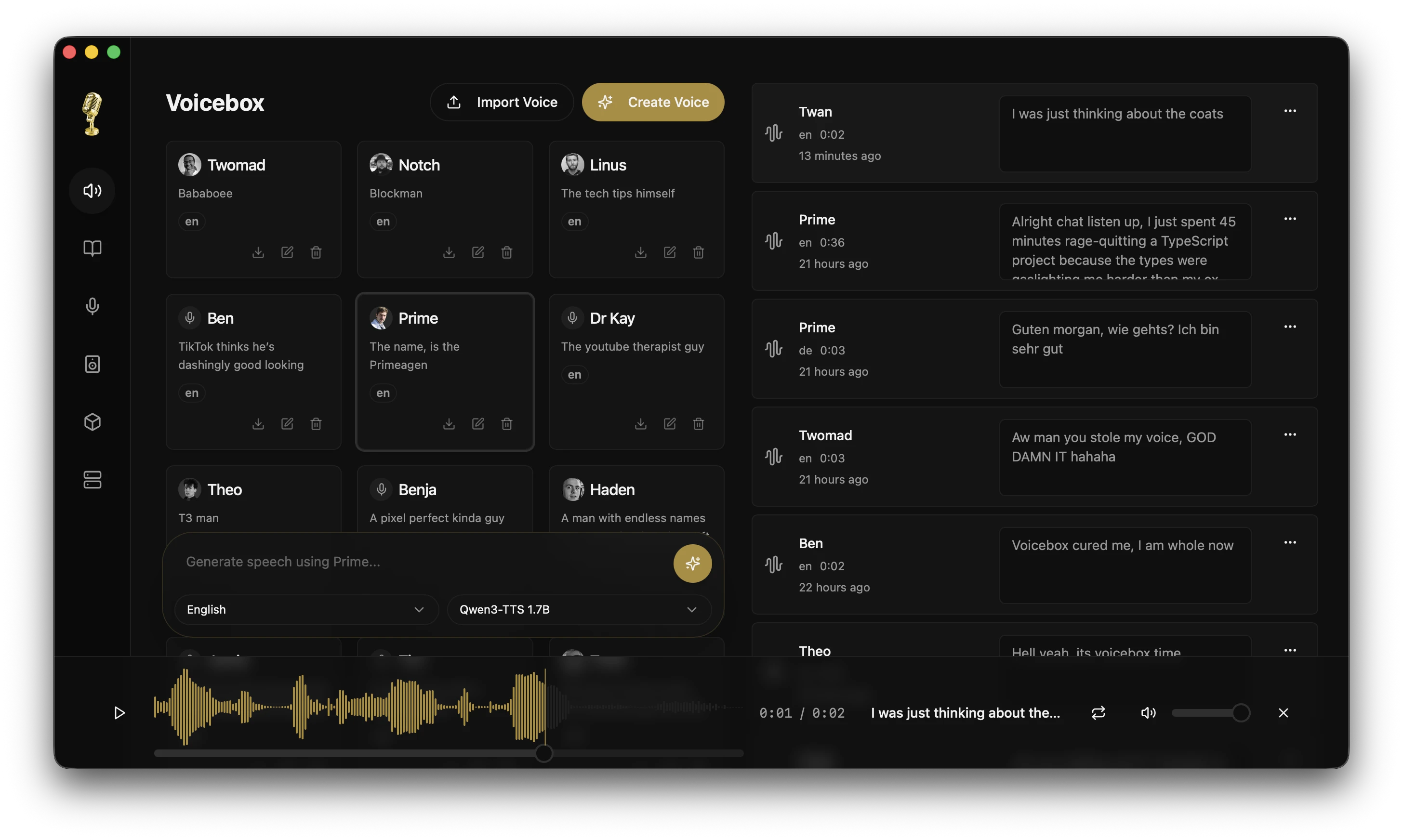
Click the image above to watch the demo video on voicebox.sh


## What is Voicebox?
Voicebox is a **local-first voice cloning studio** with DAW-like features for professional voice synthesis. Think of it as the **Ollama for voice** — download models, clone voices, and generate speech entirely on your machine.
Unlike cloud services that lock your voice data behind subscriptions, Voicebox gives you:
- **Complete privacy** — models and voice data stay on your machine
- **Professional tools** — multi-track timeline editor, audio trimming, conversation mixing
- **Model flexibility** — currently powered by Qwen3-TTS, with support for XTTS, Bark, and other models coming soon
- **API-first** — use the desktop app or integrate voice synthesis into your own projects
- **Native performance** — built with Tauri (Rust), not Electron
- **Super fast on Mac** — MLX backend with native Metal acceleration for 4-5x faster inference on Apple Silicon
Download a voice model, clone any voice from a few seconds of audio, and compose multi-voice projects with studio-grade editing tools. No Python install required, no cloud dependency, no limits.
---
## Download
### Desktop App
| Platform | Download |
| --------------------- | --------------------------------------------------------------------------------------------------------------------------- |
| macOS (Apple Silicon) | [Download latest release](https://github.com/jamiepine/voicebox/releases/latest) |
| macOS (Intel) | [Download latest release](https://github.com/jamiepine/voicebox/releases/latest) |
| Windows (MSI) | [Download latest release](https://github.com/jamiepine/voicebox/releases/latest) |
| Windows (Setup) | [Download latest release](https://github.com/jamiepine/voicebox/releases/latest) |
| Linux (AppImage) | [Download latest release](https://github.com/jamiepine/voicebox/releases/latest) |
| Linux (Deb) | [Download latest release](https://github.com/jamiepine/voicebox/releases/latest) |
### Docker
Run Voicebox with the web UI in Docker - perfect for servers and headless deployments:
```bash
# CPU-only (supports amd64 and arm64)
docker run -p 8000:8000 -v voicebox-data:/app/data \
ghcr.io/jamiepine/voicebox:latest
# NVIDIA GPU (recommended for performance)
docker run --gpus all -p 8000:8000 -v voicebox-data:/app/data \
ghcr.io/jamiepine/voicebox:latest-cuda
```
Or use Docker Compose:
```bash
docker compose up -d
```
Open http://localhost:8000 to access the web UI.
See [Docker Deployment Guide](docs/overview/docker.mdx) for cloud deployments, GPU setup, and more.
---
## Features
### Voice Cloning with Qwen3-TTS
Powered by Alibaba's **Qwen3-TTS** — a breakthrough model that achieves near-perfect voice cloning from just a few seconds of audio.
- **Instant cloning** — Upload a sample, get a voice profile
- **High fidelity** — Natural prosody, emotion, and cadence
- **Multi-language** — English, Chinese, and more coming
- **Lightning fast on Mac** — MLX backend leverages Apple Silicon's Neural Engine for super fast generation
### Voice Profile Management
- **Create profiles** from audio files or record directly in-app
- **Import/Export** profiles to share or backup
- **Multi-sample support** — combine multiple samples for higher quality cloning
- **Organize** with descriptions and language tags
### Speech Generation
- **Text-to-speech** with any cloned voice
- **Batch generation** for long-form content
- **Smart caching** — regenerate instantly with voice prompt caching
### Stories Editor
Create multi-voice narratives, podcasts, and conversations with a timeline-based editor.
- **Multi-track composition** — arrange multiple voice tracks in a single project
- **Inline audio editing** — trim and split clips directly in the timeline
- **Auto-playback** — preview stories with synchronized playhead
- **Voice mixing** — build conversations with multiple participants
### Recording & Transcription
- **In-app recording** with waveform visualization
- **System audio capture** — record desktop audio on macOS and Windows
- **Automatic transcription** powered by Whisper
- **Export recordings** in multiple formats
### Generation History
- **Full history** of all generated audio
- **Search & filter** by voice, text, or date
- **Re-generate** any past generation with one click
### Flexible Deployment
- **Desktop app** — Native apps for macOS, Windows, and Linux
- **Docker** — Deploy to servers with the web UI included
- **Remote mode** — Connect desktop app to a remote GPU server
- **Cloud ready** — Deploy to AWS, GCP, DigitalOcean, or any cloud provider
---
## API
Voicebox exposes a full REST API, so you can integrate voice synthesis into your own apps.
```bash
# Generate speech
curl -X POST http://localhost:8000/generate \
-H "Content-Type: application/json" \
-d '{"text": "Hello world", "profile_id": "abc123", "language": "en"}'
# List voice profiles
curl http://localhost:8000/profiles
# Create a profile
curl -X POST http://localhost:8000/profiles \
-H "Content-Type: application/json" \
-d '{"name": "My Voice", "language": "en"}'
```
**Use cases:**
- Game dialogue systems
- Podcast/video production pipelines
- Accessibility tools
- Voice assistants
- Content creation automation
Full API documentation available at `http://localhost:8000/docs` when running.
---
## Tech Stack
| Layer | Technology |
| ---------------- | --------------------------------------------------- |
| Desktop App | Tauri (Rust) |
| Frontend | React, TypeScript, Tailwind CSS |
| State | Zustand, React Query |
| Backend | FastAPI (Python) |
| Voice Model | Qwen3-TTS (PyTorch or MLX) |
| Transcription | Whisper (PyTorch or MLX) |
| Inference Engine | MLX (Apple Silicon) / PyTorch (Windows/Linux/Intel) |
| Database | SQLite |
| Audio | WaveSurfer.js, librosa |
**Why this stack?**
- **Tauri over Electron** — 10x smaller bundle, native performance, lower memory
- **FastAPI** — Async Python with automatic OpenAPI schema generation
- **Type-safe end-to-end** — Generated TypeScript client from OpenAPI spec
### TTS Provider Architecture
Voicebox uses a modular provider system to support different inference backends:
- **`apple-mlx`** — Bundled with macOS Apple Silicon builds
- Uses MLX with native Metal acceleration (4-5x faster)
- Works out of the box, no download required
- **`pytorch-cpu`** — Universal CPU provider (bundled or downloaded)
- Bundled with Windows and macOS Intel builds
- Downloaded on first use for Linux (~300MB)
- **`pytorch-cuda`** — Optional NVIDIA GPU-accelerated provider
- Windows/Linux only (~2.4GB)
- 4-5x faster inference on CUDA-capable GPUs
macOS and Windows builds work out of the box with bundled providers. Linux users download a provider on first launch. The app automatically detects your hardware and recommends the best option. All downloadable providers are distributed via Cloudflare R2 for fast, global delivery.
---
## Roadmap
Voicebox is the beginning of something bigger. Here's what's coming:
### Coming Soon
| Feature | Description |
| ----------------------- | -------------------------------------------------- |
| **Real-time Synthesis** | Stream audio as it generates, word by word |
| **Conversation Mode** | Multi-speaker dialogues with automatic turn-taking |
| **Voice Effects** | Pitch shift, reverb, M3GAN-style effects |
| **Timeline Editor** | Audio studio with word-level precision editing |
| **More Models** | XTTS, Bark, and other open-source voice models |
### Future Vision
- **Voice Design** — Create new voices from text descriptions
- **Project System** — Save and load complex multi-voice sessions
- **Plugin Architecture** — Extend with custom models and effects
- **Mobile Companion** — Control Voicebox from your phone
Voicebox aims to be the **one-stop shop for everything voice** — cloning, synthesis, editing, effects, and beyond.
---
## Development
See [CONTRIBUTING.md](CONTRIBUTING.md) for detailed setup and contribution guidelines.
**Using the Makefile (recommended):** Run `make help` to see all available commands for setup, development, building, and testing.
### Quick Start
**With Makefile (Unix/macOS/Linux):**
```bash
# Clone the repo
git clone https://github.com/voicebox-sh/voicebox.git
cd voicebox
# Setup everything
make setup
# Start development
make dev
```
**Manual setup (all platforms):**
```bash
# Clone the repo
git clone https://github.com/voicebox-sh/voicebox.git
cd voicebox
# Install dependencies
bun install
# Install Python dependencies
cd backend && pip install -r requirements.txt && cd ..
# Start development
bun run dev
```
**Prerequisites:** [Bun](https://bun.sh), [Rust](https://rustup.rs), [Python 3.11+](https://python.org).
**Performance:**
- **Apple Silicon (M1/M2/M3)**: Uses MLX backend with native Metal acceleration for 4-5x faster inference
- **Windows/Linux/Intel Mac**: Uses PyTorch backend (CUDA GPU recommended, CPU supported but slower)
### Project Structure
```
voicebox/
├── app/ # Shared React frontend
├── tauri/ # Desktop app (Tauri + Rust)
├── web/ # Web deployment
├── backend/ # Python FastAPI server
├── landing/ # Marketing website
└── scripts/ # Build & release scripts
```
---
## Contributing
Contributions welcome! See [CONTRIBUTING.md](CONTRIBUTING.md) for guidelines.
1. Fork the repo
2. Create a feature branch
3. Make your changes
4. Submit a PR
## Security
Found a security vulnerability? Please report it responsibly. See [SECURITY.md](SECURITY.md) for details.
---
## License
MIT License — see [LICENSE](LICENSE) for details.
---
voicebox.sh